USB Extender set ��������������������������������������������������
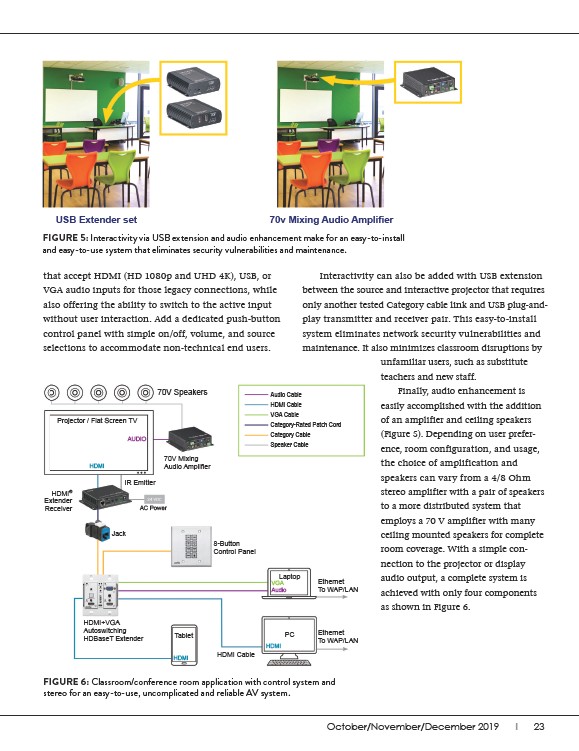
FIGURE 5: Interactivity via USB extension and audio enhancement make for an easy-to-install
and easy-to-use system that eliminates security vulnerabilities and maintenance.
October/November/December 2019 I 23
that accept HDMI (HD 1080p and UHD 4K), USB, or
VGA audio inputs for those legacy connections, while
also offering the ability to switch to the active input
without user interaction. Add a dedicated push-button
control panel with simple on/off, volume, and source
selections to accommodate non-technical end users.
unfamiliar users, such as substitute
teachers and new staff.
Finally, audio enhancement is
easily accomplished with the addition
of an amplifier and ceiling speakers
(Figure 5). Depending on user preference,
room configuration, and usage,
the choice of amplification and
speakers can vary from a 4/8 Ohm
stereo amplifier with a pair of speakers
to a more distributed system that
employs a 70 V amplifier with many
ceiling mounted speakers for complete
room coverage. With a simple connection
to the projector or display
audio output, a complete system is
achieved with only four components
as shown in Figure 6.
70V Speakers
Projector / Flat Screen TV
70V Mixing
����������������������������
HDMI+VGA
Autoswitching
HDBaseT Extender
8-Button
Control Panel
HDMI Cable
Ethernet
To WAP/LAN
Ethernet
To WAP/LAN
HDMI
HDMI
Laptop
VGA
Audio
HDMI
AUDIO
Audio Cable
HDMI Cable
VGA Cable
Category-Rated Patch Cord
Category Cable
Speaker Cable
IR Emitter
HDMI®
Extender
Receiver
Jack
AC Power
Tablet PC
Interactivity can also be added with USB extension
between the source and interactive projector that requires
only another tested Category cable link and USB plug-andplay
transmitter and receiver pair. This easy-to-install
system eliminates network security vulnerabilities and
maintenance. It also minimizes classroom disruptions by
FIGURE 6: Classroom/conference room application with control system and
stereo for an easy-to-use, uncomplicated and reliable AV system.